
Your situation
Who WordPress maintenance helps
Updates keep piling up, or nobody is sure the backups work. We look after WordPress, themes and plugins, try each update round on a staging copy first and keep backups we have restored as a test. After each round you receive a short report of what changed.
- Long update list
- WordPress shows a long list of pending updates
- A bad experience
- An earlier update caused trouble on your site
- Unchecked backups
- You are not sure whether the backups can be restored
- Orphaned plugins
- Some plugins are no longer maintained by their makers
Approach
The routine behind every update round
WordPress updates run the same way every round, and that is the point: a fixed order of backup, test, update and check makes surprises rare and easy to undo. We update in small groups instead of all at once. If something behaves differently, we know exactly which change caused it.
-
Inventory
Plugins, themes and versions listed with their update status. Plugins that no longer get updates are flagged, with a maintained alternative suggested.
-
Backup
A fresh, complete backup first, so the way back is ready.
-
Staging test
Updates applied to the test copy and key functions checked.
-
Update
Approved updates rolled out to the live site.
-
Check
Pages, forms and checkout checked again on the live site.
-
Report
A short overview of what changed and what is next.
Staying informed
Routine updates, visible to you
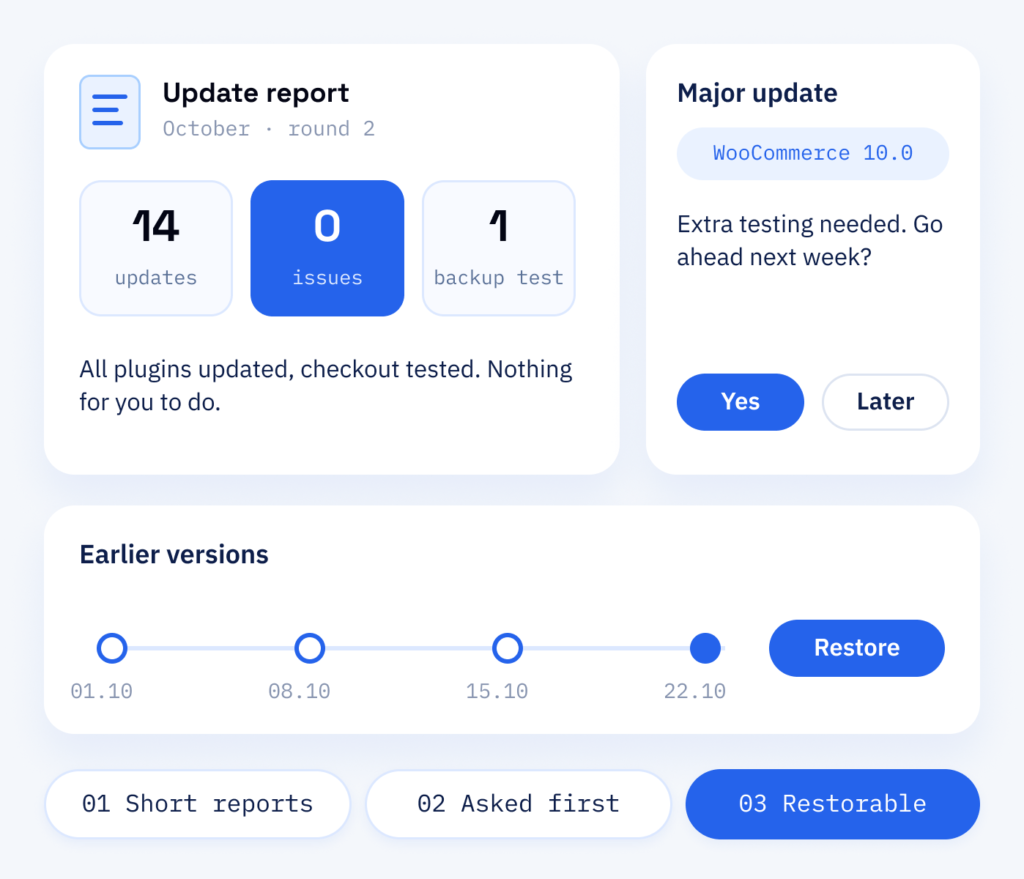
You don’t have to follow the updates yourself: if a larger one needs a decision or extra testing, we ask you first. After each round you get a short report, so you can always see what happened. Updates and backups are part of the maintenance plans in our WordPress support, so the same team stays with your site from the first briefing to ongoing care after launch.
- Short reports, no technical jargon
- Larger updates agreed in advance
- Earlier versions restorable on request
What you receive
Updates followed by a check of checkout and forms
Regular updates close known security gaps and bring new features. A planned routine checks checkout and forms along the way, and a backup we can restore brings the previous version back if something behaves differently.
So you can see where things stand
- Every plugin and version known
- Plugins without updates flagged, with a maintained alternative
- A backup that brings the previous version back
For the ongoing work
- Regular updates of WordPress itself (the core), themes and plugins
- Update rounds run on staging first
- Backups with a test restore
- A short report after each update round
Benefits
WordPress backups and updates with ScaleAble
We develop custom blocks and plugins ourselves, as our case studies show, so we know what an update can break and how to catch it on staging first.
-
Staging comes first
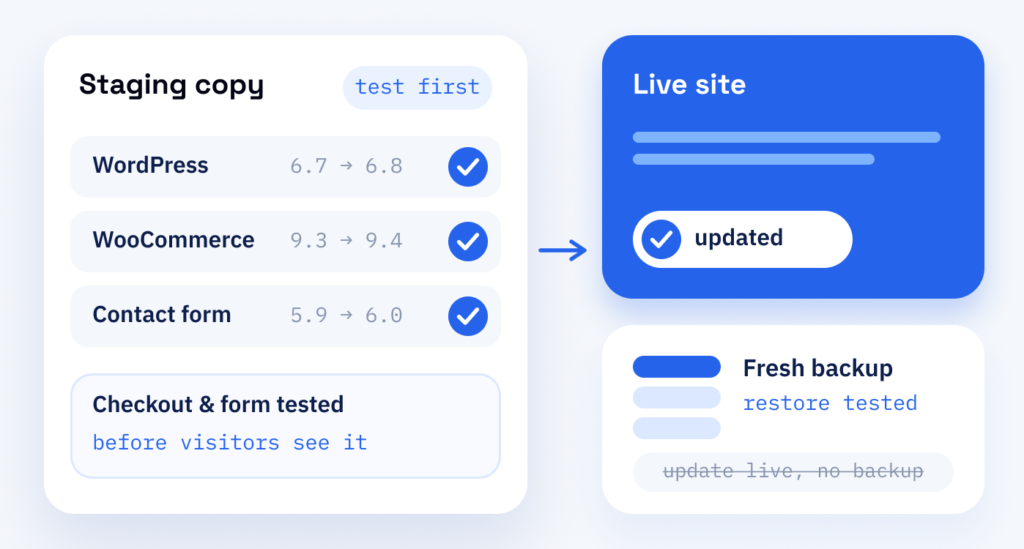
Update rounds run on a copy of your site first, where we check key pages, forms and checkout before going live. Small changes outside a round go straight live.
-
Backups with a trial run
We restore backups as a test, so the way back has been tried by the time you need it.
-
Custom code included
Custom blocks and plugins are checked against new WordPress versions too, not just the plugins from the directory.
-
Clear reports
After each round you see what was updated and checked and where a decision is needed.
Comparing the options
Why update rounds run on a copy first
WordPress, themes and plugins publish new versions regularly, with security fixes and new features. Most updates run without trouble; now and then one changes how a checkout or a contact form behaves.
On the live site, your visitors are the first to notice. If we run updates on a staging copy first, we see it beforehand, and a backup restored as a test brings the previous version back.
Never run updates directly on the live site without a fresh backup. A change can then be repaired, but not simply undone.
Cost
What you pay for in WordPress maintenance
-
Plugins, shop and plan
How many plugins your site uses, whether a shop with orders is involved and which maintenance plan fits. We look at the site first and recommend the plan that fits.
-
A long-neglected site
A site that has not been updated for a long time and plugins without vendor updates may need a one-off clean-up before ongoing care begins.
-
Care that continues
The maintenance plan you choose keeps running, and we look after your site. A shorter update cycle and Cloudflare protection in front of the site are part of the Premium plan.
Once it is running
After the update, monitoring takes over
Every update round is followed by checks from our uptime monitoring, which keeps checking that your site can be reached. If a change affects the site, the developers who ran the update already know where to look.
Part one
Updates & backups
WordPress, themes and plugins kept current, with a restorable backup behind every update round.
- A list of all plugins, themes and their versions
- Updates tried on a staging copy
- Backups checked by test restores
Part two
Uptime monitoring
Continuous checks that your site is reachable and working, including after every update round.
- Availability checks for key pages
- An alert when the site stops responding
- A fix by the developers who ran the update