
What you need
Extend plugins, keep updates
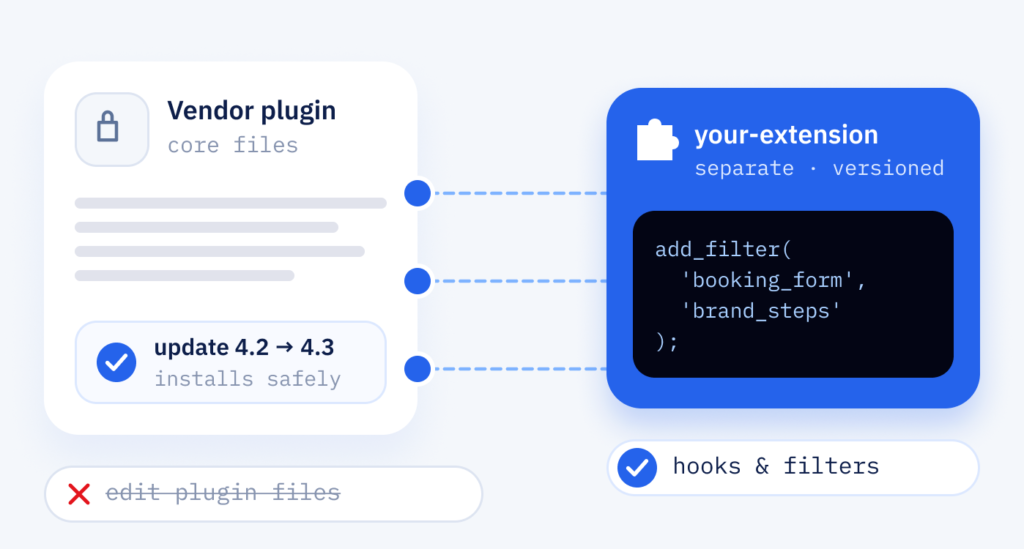
Your shop or website relies on plugins that do almost everything right. We add the missing part, such as an extra field, a different checkout rule or a shipping calculation of your own, through these connection points and filters and through separate extension code. The vendor’s files stay untouched, so you can keep installing their updates.
- Almost fits
- A plugin does almost what you need
- Updates put off
- Updates are skipped because they undo changes
- Old direct edits
- Earlier edits were made inside plugin files
- Rules of your own
- Shipping or pricing rules don’t fit your business
Approach
A plugin extension in six steps
We read the plugin before we change it. An analysis shows which hooks and options exist, and the plan uses them wherever it can. Small changes go straight to the live site. Update rounds and larger versions are checked first against the current plugin version on a test copy of your website (staging), so it shows up if an update damages the extension.
-
Audit
Plugin, version and any earlier edits reviewed.
-
Hooks & options
Every available hook, filter and setting listed. Overriding the plugin’s page templates or copying functions stays the last resort.
-
Extension plan
Which change goes where, laid out clearly for you.
-
Development
Extension developed as separate code in Git, a version control system. All changes sit in a plugin of their own or a separate code layer (child code), so the original can be replaced by a new version without losing your adjustments.
-
Update test
Plugin updated on the test copy and the extension checked again, before a larger update reaches the live site.
-
Release
The extension goes live with notes on everything that changed.
Working together
Small changes, clearly explained
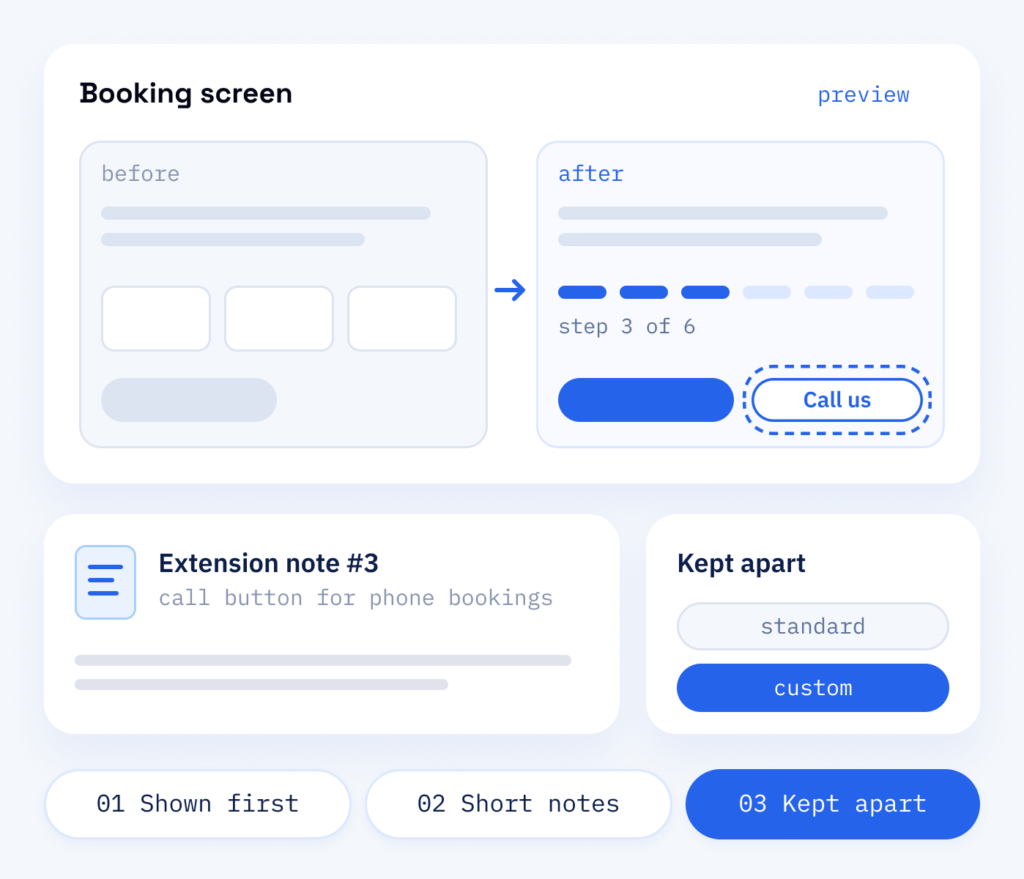
Extensions are often small, but they touch tools your team uses every day. So we show you what will change on which screen and go through the plan with you. After the release you receive a short note on each extension, so your team always knows what is standard and what has been adapted.
- Changes shown in advance
- A short note per extension
- Standard and custom kept apart
The outcome
Keep your tools, fill the gaps
Replacing a plugin your team knows costs time and puts working data at risk. An extension keeps what already works and adds only what was missing, with less work than a rebuild and without touching the original.
What stays for your team
- The familiar WordPress admin (backend) and your existing data
- The vendor’s updates, still installable
- A short note on each extension
What comes with the service
- An audit of the plugin’s hooks and options
- Extensions in a separate, versioned plugin
- Earlier direct edits moved into safe code
- An update test on staging before each major version
Why it makes sense
Extending plugins with ScaleAble
We extend WooCommerce and other widely used plugins in our own projects, for net and gross prices, request-only products and custom shipping rules, so we know where their hooks are.
-
Updates stay possible
Vendor files are never edited, so you can keep installing security and feature updates.
-
Smallest change
We look for an existing option, hook or filter first and write new code only where the plugin offers no way in.
-
Staging first
Before a major plugin update, we check your extensions against the new version on staging.
-
Fully documented
Each extension is listed with what it changes and why, so nobody has to guess later which behaviour is custom.
The better route
Stop editing plugin files
Direct edits to a plugin’s files disappear with the next vendor update. You are then left choosing between security fixes and your own features, so never edit plugin files directly.
A second route uses the plugin’s hooks and filters to change its behaviour from the outside. Your additions live in a separate, versioned extension, so you keep the vendor’s updates, the familiar backend and your existing data. A new plugin, a third route, fits when the existing one offers no way in at the point that matters or the function holds core business rules.
In practice it looks like this at Beauty Corner Rubin, a salon in St. Gallen: Bookly, a plugin for appointment booking, runs inside a booking block in the salon’s brand, with a six-step booking form and a call button for treatments booked by phone. Booking, payment and vouchers are connected through their own plugins and a small must-use plugin, which WordPress always loads.
Cost
What decides the price of a plugin customization
-
The plugin and its changes
The plugin itself, the number of changes and the update tests it needs. After a short analysis you know what to expect.
-
Earlier direct edits
Changes already sitting in plugin files have to be moved into update-safe code, or the next update will wipe them.
-
New vendor versions
New releases have to work together with your extension. The tests for that and any adjustments run through WordPress maintenance.
Later on
Extension and maintenance
Plugins release new versions all the time. Within our WordPress maintenance plan, we test your extension with each larger update and adjust it when the vendor changes a hook or a template.
Part one
Extension
The missing behaviour added through hooks and separate code, with the original plugin left untouched.
- Review of the plugin’s hooks, filters and settings
- Extension developed as its own small plugin
- Documentation of every changed behaviour
Part two
Maintenance
The same extension kept working as the original plugin, WordPress and WooCommerce move on.
- Update tests on staging with your extensions active
- Adjustments when a vendor changes a hook
- Clear advice on when an update is safe to install