What we set up
Cloudflare protection for WordPress
Cloudflare runs between your visitors and your server and stops attacks before they reach WordPress: DDoS floods, password guessing on the login, bots scraping your pages and known exploit patterns. We set up the web application firewall service for WordPress and WooCommerce and keep the rules current as your site changes.
- WAF
- Rules for known exploits
- DDoS
- Floods stopped at the edge
- Bots
- Search engines in, scrapers out
- Limits
- Rate limiting on logins
Why it needs care
Firewall rules need upkeep
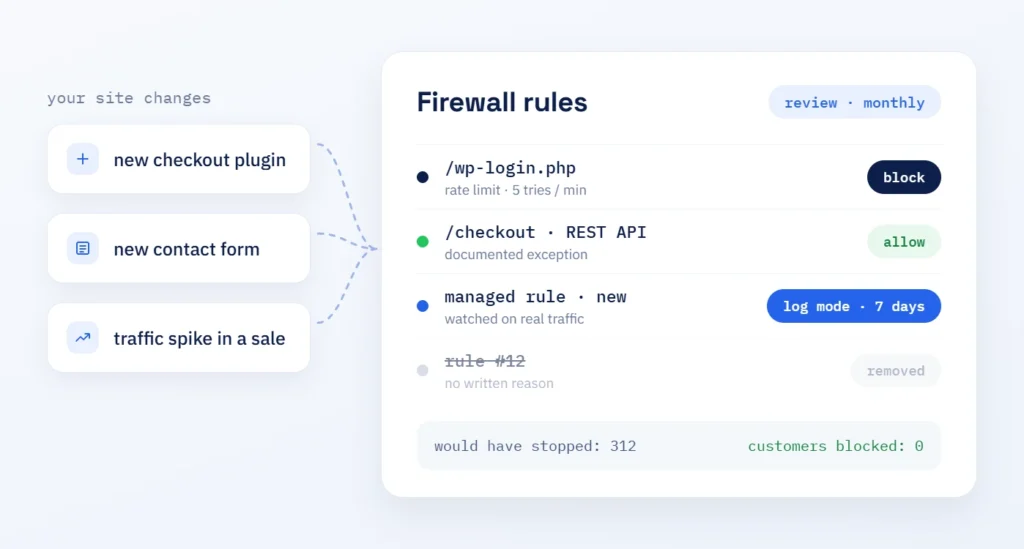
What changes: your site does. A new checkout plugin, a new form or a traffic spike from a sale can turn a sensible rule into one that blocks paying customers, while new attack patterns slip past rules written a year ago.
What it looks like on a live store: Poolroboter.ch, a Swiss shop for pool robots, runs every page behind Cloudflare. Its WordPress login sits at its own address, and anyone who tries the default one sees a Cloudflare challenge first (case study, October 2026).
From day one: we never turn on every managed rule at once. Each new rule runs in log mode first, we check what it would have stopped, and only then does it block.
What changes
Fewer attacks reach WordPress
With WAF rules, DDoS protection, rate limits and Cloudflare bot management in place, every request the firewall stops never reaches PHP, the database or your login form. That means less load on your server, fewer failed logins in your logs and fewer chances for an outdated plugin to be found.
When you need it
- Bots keep hitting your login page
- Traffic spikes slow your site down
- A plugin vulnerability is in the news
- Nobody has reviewed your Cloudflare rules
What you get
- A WAF rule set matched to your site
- DDoS and rate limiting settings in place
- Bot rules that let search engines through
- DNS and CDN documented in one account
Benefits
Why Cloudflare with ScaleAble
We build and maintain WordPress sites, so we know which plugin needs which exception and which request is a real customer.
-
Log mode first
Rules run in log mode before they block, so your customers are never the test case.
-
WordPress exceptions
Checkout, REST API and admin requests get documented exceptions, so the store keeps working.
-
Crawlers get through
Search engine and AI crawlers are verified before bot rules apply, so blocking bots does not block your visibility.
-
Account in your name
The Cloudflare account stays with your company, so you see every change and can remove our access at any time.
Principles
How we manage Cloudflare
-
Observe, then block
A new rule logs before it blocks. Each decision rests on real traffic data.
-
One rule, one reason
Every rule has a clear purpose. Rules without one are removed at the next review.
-
Visitors first
Challenges appear only where the risk is real: logins, forms and suspicious traffic.
Setup and care
Setup first, then regular review
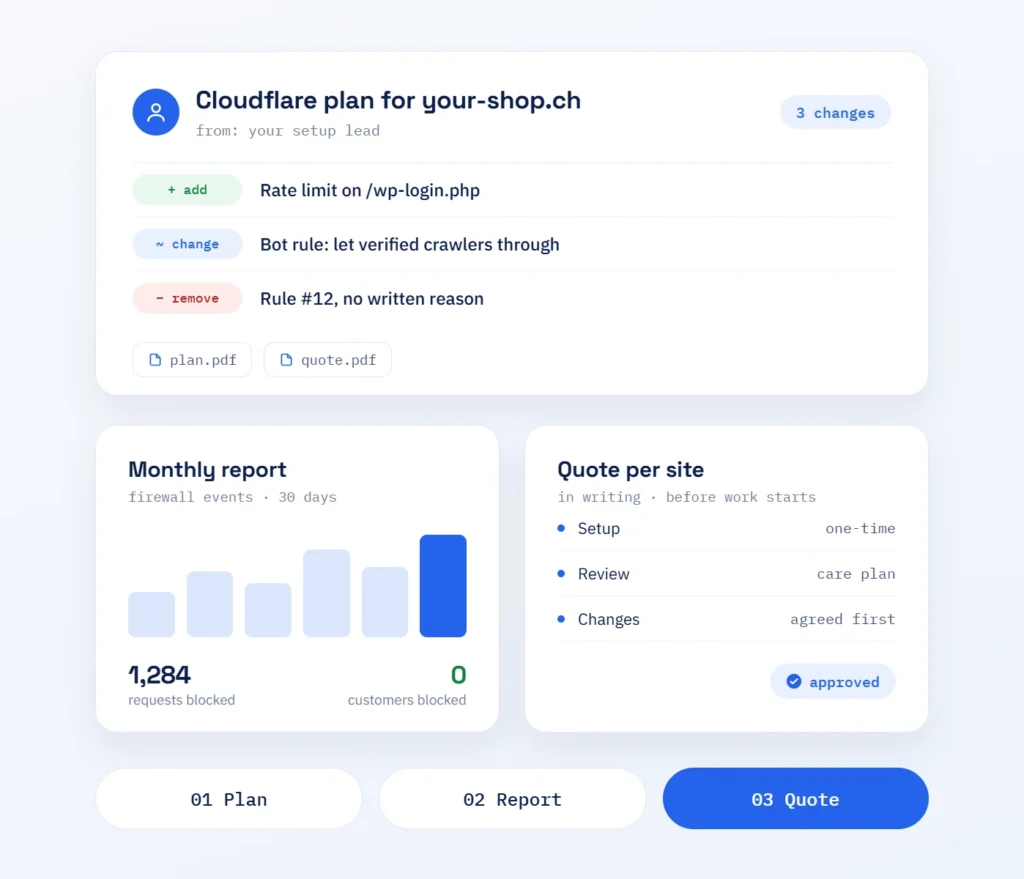
The setup is a one-time project: DNS moved, WAF rules, DDoS settings, rate limiting and bot filter configured and tested. After that, the review runs within our care plan: we read the firewall events on a fixed cycle, adjust rules when your plugins or traffic change and report what was blocked. RankExperts, our brand for SEO and content, checks that search engines and AI crawlers still reach your pages. Because Cloudflare processes visitors’ IP addresses, we also list what your privacy notice should mention under the Swiss Federal Act on Data Protection (FADP).
Part one
Setup
Cloudflare in front of your site, configured for WordPress.
- DNS records moved and checked
- WAF rules and rate limits configured
- Bot rules tested in log mode
Part two
Review
Rules kept current as your site and traffic change.
- Firewall events read on a fixed cycle
- Rules adjusted when your site changes
- Short report on what was blocked
Process
Our Cloudflare workflow
We start with what your site already has: DNS, plugins, traffic and any Cloudflare settings in place. Every rule goes through log mode before it blocks.
-
Audit
Current DNS, plugins and traffic reviewed.
-
DNS
Records moved to Cloudflare and checked.
-
Rules
WAF, rate limits and bot rules drafted.
-
Log mode
Rules observed on real traffic.
-
Enforce
Rules switched to block or challenge.
-
Review
Events read and rules adjusted in the care plan.
Working together
Everything by email
You reach us by email, and every answer comes from the person who set up your Cloudflare rules. You get plans and reports in a form you can pass straight to your team or your developer.
- Answers from your setup lead
- Plans and reports to pass on
- One proposal per site