
Typical cases
Connect marketplaces instead of maintaining everything twice
You sell on a marketplace such as Galaxus, Amazon or eBay and also run a WooCommerce store. With a marketplace integration you keep products, prices and stock in the shop, they go from there to each channel, and marketplace orders can flow back into WooCommerce. You look after one catalogue with one login.
- Stock by hand
- Stock is updated on each marketplace by hand
- Sold out, still listed
- An item sold out in the shop is still listed elsewhere
- Double entry
- Product data is entered twice or more
- Scattered orders
- Marketplace orders arrive outside your shop
Project flow
How your catalogue gets onto the marketplace
Marketplaces are strict about data. We choose the channels with you, clean up the catalogue, match it to each channel’s rules and switch on the sync once test orders have gone through cleanly. Order data from a marketplace is transferred only as far as shipping and invoicing need it, in line with the Swiss data protection act (FADP).
-
Channels
Which marketplaces fit your range, margins and market.
-
Data
Titles, images, attributes and identifiers completed in WooCommerce, because a sync only spreads what is in the catalogue.
-
Mapping
Your categories and fields matched to each channel’s requirements.
-
Sync
Stock, prices and orders connected between shop and channels. WooCommerce stays the one place where products, prices and stock are maintained.
-
Tests
Orders placed on each channel and followed into WooCommerce.
-
Launch
Channels switched on, listings and stock checked regularly.
Who does what
Clear roles per channel
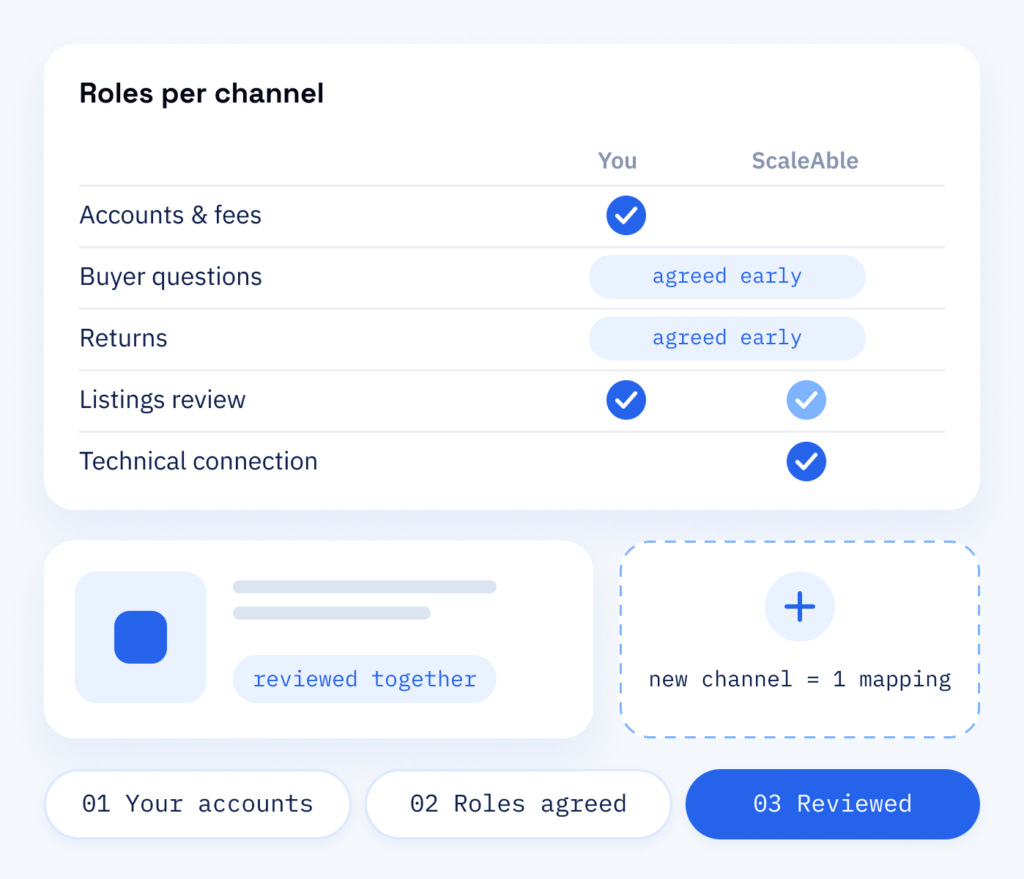
Marketplace accounts, contracts and fees stay with you, and the technical connection is ours. Early on we agree together who answers buyer questions, who handles returns and who keeps an eye on the listings.
Later, a new channel means one more mapping on the same catalogue, and the connection is kept up to date within our WordPress maintenance plan.
- Your accounts, our connection
- Roles agreed before launch
- Listings reviewed together
What is delivered
More channels, one catalogue
With one catalogue in charge, a new channel can bring buyers without a second shop to maintain. Prices stay aligned, stock is shared and the product data you improve once works everywhere.
On the channels
- Your chosen channels connected to WooCommerce
- Product data matched to the rules of each channel
- Test orders checked on every channel
- Listings reviewed before they go live
In your shop
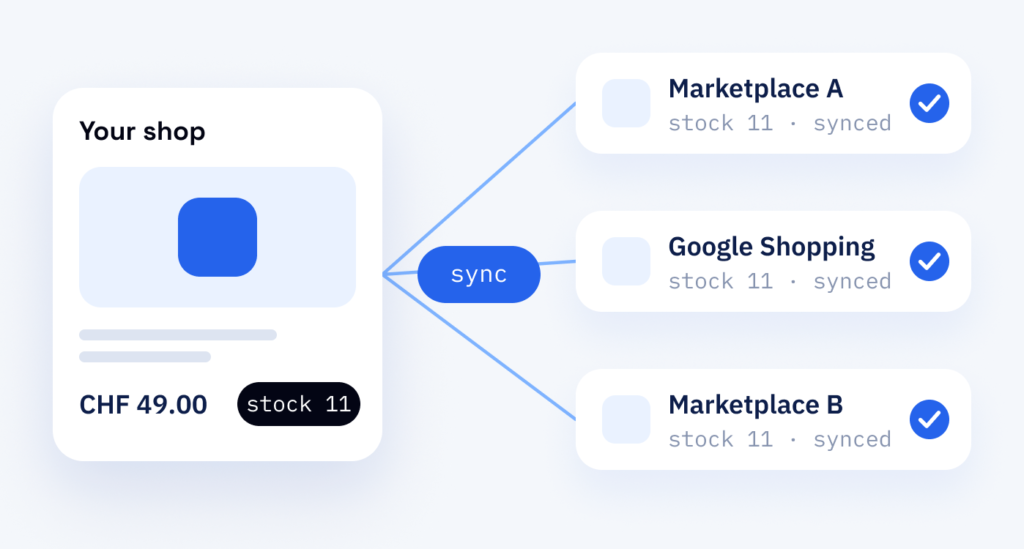
- Stock and prices synced automatically
- Titles, images and attributes kept together
- One catalogue with one login
- Orders that can flow back into WooCommerce
Why it helps
Marketplaces with ScaleAble
Marketplace integrations are part of our web development services. If we also develop your shop and its product data, we plan marketplaces in from the beginning, so each channel’s requirements are in the catalogue from the outset.
-
Clean product data
We tidy up attributes, variants and identifiers once in WooCommerce, then every marketplace and feed uses them.
-
Channel rules covered
Each marketplace has its own categories, fields and image rules, and we match your data to them.
-
Shared stock
A sale on one channel updates the shared stock and lowers the risk of offering an item that is already gone.
-
Feeds per language
Product feeds for Google Shopping, the product files Google reads, come from the same catalogue, one per shop language.
Where to begin
Better channel by channel than all at once
Many buyers start on a marketplace or in Google Shopping, look for what they need and compare offers. Selling there by hand means entering every product twice, prices drifting apart and items staying listed that the shop sold long ago.
Even so, connect only part of your catalogue at first, because one error in titles or variants would otherwise appear in every listing. We begin with one channel and part of the range.
After that we connect the other channels to your WooCommerce catalogue: a change in the shop reaches each channel, and a sale on one channel updates the shared stock.
Cost
The cost of a marketplace integration
-
Channels and catalogue size
How many channels there are, how large the catalogue is and how much product data has to be added. We show you what the connection means for your catalogue.
-
Clean-up and fees
Cleaning up the product data before the first sync, plus the fees of the marketplaces. You agree those fees directly with each marketplace.
-
Keeping it connected
The connection has to stay up to date, which runs through the maintenance plan. Each further channel means one more mapping, and we check rejected listings regularly.
Once it runs
Feeds and search for your listings
Once a channel is live, RankExperts, our brand for online marketing and content, prepares product titles and attributes for search on Google Shopping and on the marketplaces. For Poolroboter.ch (RENIOS Invest AG) we set up the shop in three languages, each with its own Google Shopping feed, as our Poolroboter case study shows. If you have no shop yet, our page on WooCommerce online shops sets out how we develop one.
Part one
Integration
Your WooCommerce store connected to the chosen channels, with products, stock and orders in sync.
- Product data mapped to each marketplace
- Automatic stock and price sync
- Checks before each channel goes live
Part two
Feeds & search
The same catalogue prepared for Google Shopping and marketplace search.
- A Google Shopping feed per shop language
- Product titles and attributes written for search
- Regular checks of rejected listings